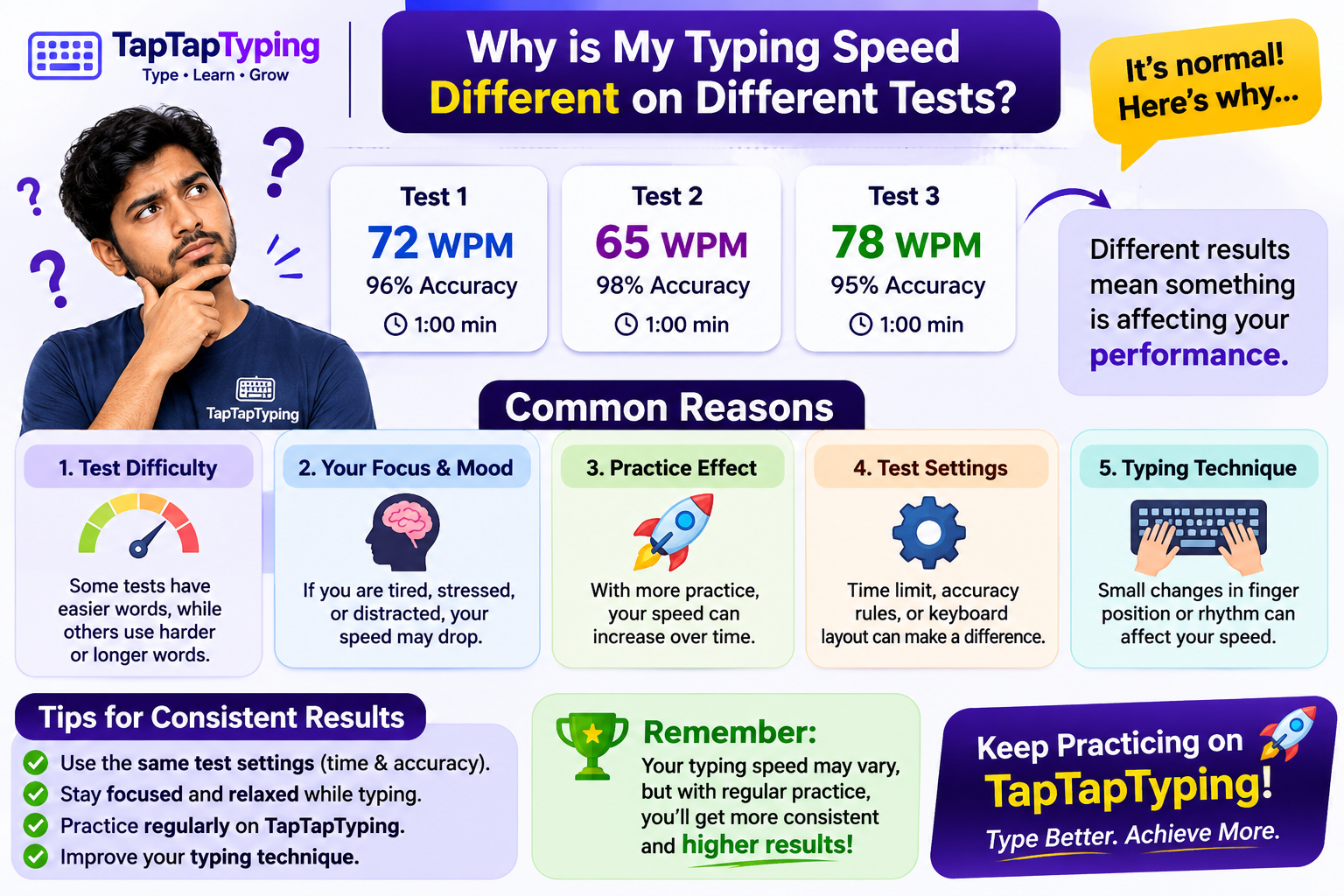
Why Is My Typing Speed Different on Different Tests?
You finish a typing test and score 55 words per minute. A few minutes later, another test gives you 43 WPM.
Which result should you trust?
Your typing speed can differ between tests because they use different text, time limits, and scoring methods. Some report raw speed, while others count only correct characters or apply an error penalty. A fair comparison requires similar test conditions and a clear understanding of what each score measures.
The useful question is not just “What is my highest WPM?” It is “What speed can I repeat while keeping my typing accurate?”
What Does WPM Actually Measure?
WPM stands for words per minute. In typing tests, a “word” commonly means five characters rather than one dictionary word. Spaces and punctuation are typically included in this standardized count.
A common gross WPM formula is:
\text{Gross WPM} = \frac{\text{Characters typed} \div 5}{\text{Time in minutes}}For example, typing 250 characters in one minute produces a gross speed of 50 WPM.
However, that calculation alone does not tell you how many characters were correct. This is where test results can start to differ: one platform may report gross WPM alongside accuracy, while another calculates speed from correct characters.
1. The Tests May Use Different Scoring Methods
Two typing tests can measure the same attempt differently.
| Metric | What it measures | What to check |
|---|---|---|
| Gross or raw WPM | Typing rate before an accuracy adjustment | Which character entries count |
| Correct-character WPM | Correct characters divided by five and adjusted for time | How corrections and unfinished text are handled |
| Error-adjusted or net WPM | Speed after an error adjustment | The platform’s exact penalty formula |
| Accuracy | The proportion of entries considered correct | Whether corrected mistakes still count |
These labels are not enough on their own. Published typing tools use different approaches to calculating speed and handling errors, so check the explanation provided by the test.
A Simple Example
Imagine that you type 300 characters in one minute, with 285 correct characters remaining at the end.
Using gross WPM:
300 \div 5 = 60 \text{ WPM}Using a correct-character calculation:
285 \div 5 = 57 \text{ WPM}Neither result has to be a calculation error. The two scores measure different things.
Before comparing scores, ask: does this test count everything I typed, or only what I typed correctly?
2. Corrected Mistakes Can Affect Accuracy Differently
Pressing Backspace does not necessarily erase a mistake from your accuracy score.
Some tests track incorrect entries even when you fix them. Others assess the text remaining at the end, so a corrected mistake may no longer appear as an error. Published typing tools describe both approaches.
For example, suppose you type:
The quick borwn foxYou notice the error and change “borwn” to “brown.”
Your final sentence is correct. But a test that tracks every entry can still record the original mistake, while a final-text check may treat the corrected sentence as error-free.
That is why matching WPM scores do not always come with matching accuracy percentages.
3. A Short Test and a Longer Test Measure Different Sessions
A one-minute result and a five-minute result should not be treated as identical measurements.
Typing.com explains that it uses three- and five-minute tests to obtain a more repeatable picture of overall typing speed and accuracy. A short test can still be useful, but its result represents a shorter sample of your typing.
For your own practice, use this approach:
- Use a short test for a quick check.
- Choose one consistent duration for progress tracking.
- Compare longer sessions separately from shorter ones.
- Record accuracy alongside speed.
If you score 60 WPM in one minute and 50 WPM over five minutes, record both results with their durations. Do not assume the higher number is your only meaningful score.
4. The Practice Text May Be Different
Consider these two passages:
we can make time to read and write every dayPlease verify invoice #4827 before Friday, November 13.The second passage adds capitalization, punctuation, and numbers. Those are different typing tasks, even if both tests use the same WPM formula.
When reviewing your results, note whether the test included:
- Common lowercase words
- Complete sentences
- Capital letters
- Numbers and symbols
- Specialized vocabulary
A fair personal comparison uses similar text settings. Otherwise, you may be comparing performance on different tasks rather than measuring improvement on the same task.
5. You May Be Comparing Your Best Attempt With a Typical Attempt
A personal record answers one question: “What is the highest score I have achieved?”
It does not answer: “What result can I usually repeat?”
For a more useful practice record, try three comparable tests and record all three results.
Here is an illustrative example—not an expected improvement benchmark:
| Attempt | WPM | Accuracy |
|---|---|---|
| 1 | 44 | 97% |
| 2 | 47 | 98% |
| 3 | 45 | 97% |
This gives you a clearer record than keeping only the 47 WPM attempt.
Use the same test duration and settings next time. Then compare the full set of results, not just the highest number.
How to Compare Typing Test Results Fairly
Use this checklist before deciding that your typing speed has improved or declined.
Step 1: Match the Test Duration
Compare a one-minute test with another one-minute test. Track longer tests separately.
Step 2: Match the Text Settings
Keep punctuation, capitalization, numbers, and language settings consistent.
Step 3: Identify the Score Type
Check whether the result is gross WPM, correct-character WPM, or an error-adjusted score. Different tools can calculate these differently.
Step 4: Record Accuracy
Keep accuracy beside WPM in your practice log. A speed number without an accuracy measure leaves out an important part of the result. Typing.com, for example, reports speed and accuracy separately rather than combining them into one adjusted number.
Step 5: Repeat the Comparison
Use several comparable attempts instead of drawing a conclusion from one unusually high or low score.
A Simple Typing Progress Tracker
Copy this table into your notes or spreadsheet:
| Date | Platform | Duration | Text settings | WPM | Accuracy |
|---|---|---|---|---|---|
| Session 1 | |||||
| Session 2 | |||||
| Session 3 |
Add a short note when something changes—for example, “numbers enabled” or “used a different keyboard.”
The goal is to make your results understandable, not just collect bigger numbers.
Put Your Next Score in Context
Visit TapTapTyping for your next typing session.
Before starting, note the available test settings. Afterward, record the displayed results and compare them with a later session under similar conditions.
Treat each score as a measurement of that particular attempt—not a permanent label for your typing ability.
Frequently Asked Questions
Why is my WPM higher on one website than another?
The websites may use different scoring methods, test durations, or passages. One may report gross WPM, while another calculates speed from correct characters. Check the scoring explanation before comparing the numbers.
Is raw WPM the same as accurate typing speed?
Not necessarily. Raw or gross WPM can describe typing rate before an error adjustment. A correct-character score measures something different. Always check how the platform defines its metric.
Why does my accuracy drop even after I fix mistakes?
Some tests count incorrect entries even if you later correct them. Other tests evaluate the final text. This difference can produce different accuracy scores for similar typing sessions.
Should I use a one-minute or five-minute typing test?
Use a consistent duration for the progress you want to track. A one-minute test provides a short sample, while longer tests show performance across a longer session. Typing.com identifies three- and five-minute tests as useful for obtaining repeatable speed and accuracy results.
Which typing test score should I put on a job application?
Follow the employer’s instructions about the platform, test duration, minimum score, and any required certificate. If those instructions are unclear, ask before submitting a result rather than assuming any online score will be accepted.